Replacing the vacuum motor in a Mirka DE 1025L

The unit is sealed and you cannot replace the brushes in the motor, so it needs to be replaced completely. The correct type to use is a Domel 1200w 128mm unit.

To replace the motor, you need to disassemble the top part of the extractor. To do this:
Prise the top off the handle to expose the torx screws.
Remove these screws and then you can remove the black plastic casing to expose the wiring and the inner casing.
Disconnect the motor wiring from the switch – two spade connectors
Remove the torx screws that hold the power cable in place.
Remove the other torx screws around the casing (there is one deep one next to the top of the motor)
Remove the casing and feed the wires through. The motor should now be free to remove.
There are two rubber seals on the motor, one underneath and one on top of the large diameter fan housing. Retain these for the replacement.
There are little retaining latches on the spade connectors where they plug onto the motor, push these down with a small screwdriver blade while you pull the plugs off.

Reassembly is the reverse of the above steps. The two wires to the motor are not polarised, the motor is AC and doesn’t care which one goes where.

lacp suspend-individual

lacp suspend-individual

Copied from a now-deleted post. Posted on January 31, 2018January 31, 2018 by David Sudjiman

When an end-host configured with port-channel LACP or NIC- or link-teaming, it requires the adjacent switch ports to receive LACP PDU to be able to start the negotiation and bring the port-channel to Up and Operational status. Without the end-host sending these LACP PDU, the switch ports will keep its status as down.

It sounds good to have this feature until you have a situation where the end-host needs to bring up just a single link while booting and without port-aggregation (LACP) it failed to send the LACP PDU to the switch. This will make the adjacent switch port to be down as part of its LACP negotiation.

This situation occurs when an end-host boots up with PXE boot to get an image but only enable a single link without LACP. The end-host’s LACP will only ever start (or to be configured) when the end-host received and installed the complete image.

In this scenario we can make the switch to bring the single interface up when the adjacent end-host is up even without sending LACP PDU. This can be achieved by telling the switch not to suspend the port if it didn’t receive LACP PDU.

lacp suspend-individual is a default configuration on Nexus switches to suspend the port if it didn’t receive LACP PDU.

The two N5K below connected to each other via port e1/1-2. Let’s assume that N5K-1 is the switch and N5K-2 is the end-host.

Ideally, both switches are configure using port-channel with LACP dynamic negotiation but for the purpose of this test, only N5K-1 is configured with LACP and N5K-2 pretend to be an end-host that just booted up with no port-channel configuration.

For testing, I’ve also put an SVI VLAN 400 in N5K1 with IP address 12.12.12.1/24 and N5K-2 with IP address 12.12.12.2/24. Configuration below.

! @ N5K-1
interface vlan 400
 ip address 12.12.12.1/24
 no shut
 
int e1/1-2
 switchport
 switchport mode access
 switchport access vlan 400
 channel-group 400 mode active
 no shut
 
int port 400
 switchport
 switchport mode access
 switchport access vlan 400
 no shut
 
N5K-1# sh port-chan sum
<omitted>
--------------------------------------------------------------------------------
Group Port- Type Protocol Member Ports
 Channel
--------------------------------------------------------------------------------
400 Po400(SD) Eth LACP Eth1/1(D) Eth1/2(D)

! @ N5K-2
int e1/1-2
 no switchport
 shut
 
int e1/1
 ip address 12.12.12.2/24

Now, let’s bring the N5K-2 (end-host) interface e1/1 up.

N5K-1# sh port-chan sum
<omitted>
--------------------------------------------------------------------------------
Group Port- Type Protocol Member Ports
 Channel
--------------------------------------------------------------------------------
400 Po400(SD) Eth LACP Eth1/1(s) Eth1/2(D)

N5K-1(config-if)# sh int status

--------------------------------------------------------------------------------
Port Name Status Vlan Duplex Speed Type
--------------------------------------------------------------------------------
Eth1/1 -- unknown e 400 full 10G SFP-H10GB-C
Eth1/2 -- notconnec 400 full 10G SFP-H10GB-C

N5K-1 (switch) port e1/1 will also come up with interface status as unknown and the port-channel status as suspended on port e1/1. Also watch that port-channel 400 status as SD - Switched-Down.

The LACP PDU counter also showing that N5K-1 (switch) is not receiving any from the end-host.

N5K-1(config-if)# show lacp counter
 LACPDUs Marker Marker Response LACPDUs
Port Sent Recv Sent Recv Sent Recv Pkts Err
---------------------------------------------------------------------
port-channel400
Ethernet1/1 165 0 0 0 0 0 0

Let’s disable the lacp suspend-individual and see what happens.

N5K-1(config-if)# int port 400
N5K-1(config-if)# no lacp suspend-individual 
ERROR: Cannot set/reset lacp suspend-individual for port-channel400 that is admin up
N5K-1(config-if)# shut
N5K-1(config-if)# no lacp suspend-individual 
Warning: !! Disable lacp suspend-individual only on port-channel with edge ports. Disabling this on network port port-channel could lead to loops.! 
N5K-1(config-if)# no shut

On a side note, you need to shut the port-channel before disabling the lacp suspend-individual command.

N5K-1# sh port-chan sum
<omitted>
--------------------------------------------------------------------------------
Group Port- Type Protocol Member Ports
 Channel
--------------------------------------------------------------------------------

400 Po400(SD) Eth LACP Eth1/1(I) Eth1/2(D) 
N5K-1# sh int status

--------------------------------------------------------------------------------
Port Name Status Vlan Duplex Speed Type
--------------------------------------------------------------------------------
Eth1/1 -- connected 400 full 10G SFP-H10GB-C
Eth1/2 -- notconnec 400 full 10G SFP-H10GB-C

See that the N5K1 port member e1/1 is now turns I - Individual and interface status shows as connected.

N5K2 (end-host) interface e1/1 status is connected and UP/UP.

N5K-2# sh ip int brief
IP Interface Status for VRF "default"(1)
Interface IP Address Interface Status
Po300 10.1.22.22 protocol-down/link-up/admin-up 
Eth1/1 12.12.12.2 protocol-up/link-up/admin-up 
N5K-2# sh int status

--------------------------------------------------------------------------------
Port Name Status Vlan Duplex Speed Type
--------------------------------------------------------------------------------
Eth1/1 -- connected routed full 10G SFP-H10GB-C
Eth1/2 -- disabled 1 full 10G SFP-H10GB-C

N5K2 (end-host) now has the L3 connectivity to reach the PXE server (wherever it might be) and ping test to N5K2 VLAN 400 IP address (gateway) also successful.

N5K-2# ping 12.12.12.1
PING 12.12.12.1 (12.12.12.1): 56 data bytes
36 bytes from 12.12.12.2: Destination Host Unreachable
Request 0 timed out
64 bytes from 12.12.12.1: icmp_seq=1 ttl=254 time=29.158 ms
64 bytes from 12.12.12.1: icmp_seq=2 ttl=254 time=2.044 ms
64 bytes from 12.12.12.1: icmp_seq=3 ttl=254 time=1.394 ms
64 bytes from 12.12.12.1: icmp_seq=4 ttl=254 time=1.397 ms

--- 12.12.12.1 ping statistics ---
5 packets transmitted, 4 packets received, 20.00% packet loss
round-trip min/avg/max = 1.394/8.498/29.158 ms

NetIQ IDM 4.6 PoC install pre-reqs

The following YUM installers will add all pre-reqs for the NetIQ PoC integrated install on RHEL


#!/bin/bash
yum install -y libXrender.i686 libXau.i686 libxcb.i686 libX11.i686 libXext.i686 libXi.i686 libXtst.i686 glibc.x86_64 libstdc++.i686 libstdc++.x86_64 libgcc.x86_64 compat-libstdc++-33.x86_64 compat-libstdc++-33.x86_64 unzip gettext ksh
yum install -y glibc.x86_64 libstdc++.x86_64 libgcc.x86_64 compat-libstdc++-33.x86_64 compat-libstdc++-33.x86_64 unzip gettext ksh
yum install -y gettext.x86_64 libstdc++.x86_64 compat-libstdc++-33.x86_64
yum install -y glibc.i686 libXau.i686 libxcb.i686 libX11.i686 libXext.i686 libXi.i686 libXtst.i686 libgcc.i686 libXrender.i686 libstdc++.x86_64 compat-libstdc++-33.i686 compat-libstdc++-33.x86_64 gperftools-libs

Fun with Arduino

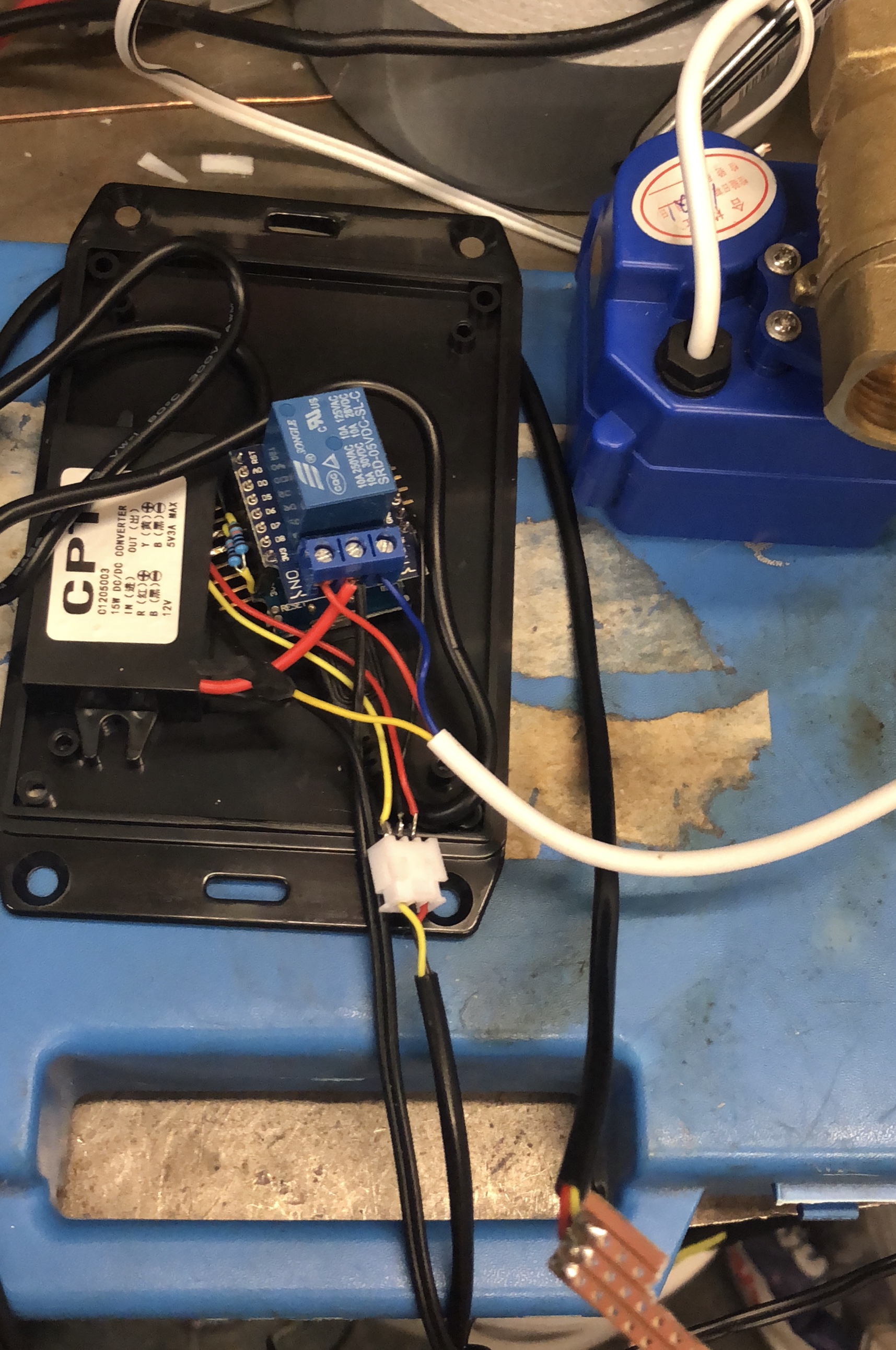
I’ve been playing with Raspberry Pi for a while and recently moved to ESP8266 with Arduino core on it. It gives me a lovely small form factor powerful IoT platform. Using it is very easy through the Arduino IDE.

Current project has been to monitor the water level in a small water feature in the garden, as it loses when the sun is out to evaporation (I know, the one-day-a-year problem of England!). So I used the ESP8266 with a very simple 3-prong water probe (copper strip board) to monitor high and low water levels, then switch a relay to open/close a 12v motorised valve and fill the bowl with water from our rain collection barrel.

I’ll add notification services to it later (it’s setup for OTA updates already).

My muse and inspiration

2012-04-05 19.54.19Although no longer this young and small, my granddaughter has shown an interest in technology from a very early age. Seeing her interest and thrill at new discoveries inspires me each day. Thankyou Maisie, love you loads xxx

VMware vSphere, MS Clusters and vMotion resulting in cluster service failures

Quick guide here, from experiences we’ve gained.

When running an active/passive MS Failover Cluster (MSFoC) in a VMware environment, you need to be aware of the behaviour of the clustering when a vMotion event happens on the active node. Because of the momentary interruption in networking and activity on the active node during the final cutover of the VM to the new host, the passive node can often see this as a failure and try to take over. As the active node is not actually down, this results in both nodes trying to run the services, resulting in ‘split-brain’ detection shutting service down on both nodes.

Our way around this issue is to set DRS for these cluster nodes to manual, making sure we’re aware they are there. In the event of vMotion being needed (maintenance generally, or for manual load balancing), we ensure the MSFoC service is shutdown on the passive node. That way we can move whatever we like as we need to without triggering a false takeover.

Bear this in mind when running MSFoC in VMware. Impact seems to be more often with shared-disk clusters, but also seen on non-shared-disk clusters too.

Cisco UCS and VLAN conflicts

If you ever find yourself with conflicting VLANs as a result of a UCS code upgrade, don’t panic. If, like us, you use NFS, and the NFS VLAN conflicted with a VSAN FCoE VLAN, you’ll likely have impacted your NFS VLAN. Once the conflict was resolved by moving the VSAN FCoE VLAN to an unused one, we still had no network traffic on the VLAN we use for NFS. We had to change the VLAN number for that VLAN to something else, commit the change, then change it back. This forced a refresh of the VLAN config and restored connectivity.

VMware vCloud Director 5.1 VXLAN install issues

Here is an interesting issue I hit today. Installing VMware vCloud Director 5.1 with vShield Manager 5.1.2a was giving me problems creating the VXLAN backend. Each time it would fail to install the VIB with “vib-module for agent not installed on host …. (vshield-vxlan-service)”. Lots of searching and an SR to VMware was raised. Then, just after raising the SR, I found my answer, thanks to this post

http://browse.feedreader.com/c/vClouds/289627048

Snipped here in case it vanishes from feedreader….

<snip>

When I tried to enable VXLAN in my vCloud Director setup I got the following error: “VIB module for agent is not installed on host vShield-VXLAN-Service”

This is solved by installing the VXLAN VIB which is available as a download on your vShield Manager: https://vsm-ip/bin/vdn/vibs/5.1/vxlan.zip on all your ESXi hosts in your VCD Cluster.

I used vCenter Update Manager to update all my ESXi hosts. no reboot is required.

After that, login to your  vCloud Networking and Security appliance (previously knows as vShield Manager), navigate to Networks, Network Virtualization and click on Preparation. Click Resolve to prepare your hosts.

</snip>

Hope this note helps someone.

Rescan SCSI bus in linux

Useful if you’ve just added a disk to a linux server and want to rescan to be able to use it:

echo “- – -” > /sys/class/scsi_host/host0/scan

vCenter custom alarms

I had a requirement today to create a custom alarm for vCenter 5.0, one that would alert me to a failed virtual disk consolidation event. This has been causing me a few issues and I want to know about it before the client does.

For anyone trying to do this, I found this page that tells all:
http://vmice.wordpress.com/2013/01/10/custom-alarms-for-events-in-vcenter-5-x/

Long and the short of it, you create a new alarm for an Event, and for the triggering event, you use the API definition. In this case, it was “com.vmware.vc.VmDiskFailedToConsolidateEvent”.

FYI, Veeam provide a nice breakdown of these API definitions:
http://www.veeam.com/support/vcEvents.html

Now, any time I get one of these events, my team will get notified and we can take action to rectify it.